SystemVerilog on macOS & Makefile
Last modified: Feb 13, 2026
Icarus Verilog (iverilog):
This is your compiler for SystemVerilog. You can install it with Homebrew.
**Make sure you have vvp.
GTKwave:
If you already tried installing it through Homebrew…
brew uninstall gtkwave
brew untap randomplum/gtkwave
brew install --HEAD randomplum/gtkwave/gtkwave
Running the files:
First, you need to compile the file.
iverilog -g2012 -o simulation.vvp tb_example.sv example.sv
- -g2012 for SystemVerilog 2012 features
- -o to specify the output file
Then execute the file with:
vvp simulation.vvp
To view the waves:
gtkwave simulation.vcd
Note that to view the wave, you need to add dumpfiles and dumpvars in your testbench file.
Also, as you might have noticed, this is not fun. So let’s use a Makefile.
Makefile:
First, create a file called Makefile.
I recommend using this.
A few things need to be changed:
simulate: $(COMPONENT).vvp
@echo "Simulating component: $(COMPONENT)"
	$(SIMULATOR) $(SFLAGS) $(COMPONENT).vvp #$(SOUTPUT)
Comment out the $(SOUTPUT) part.
Also, I added *.vvp to my clean rule.
Example:
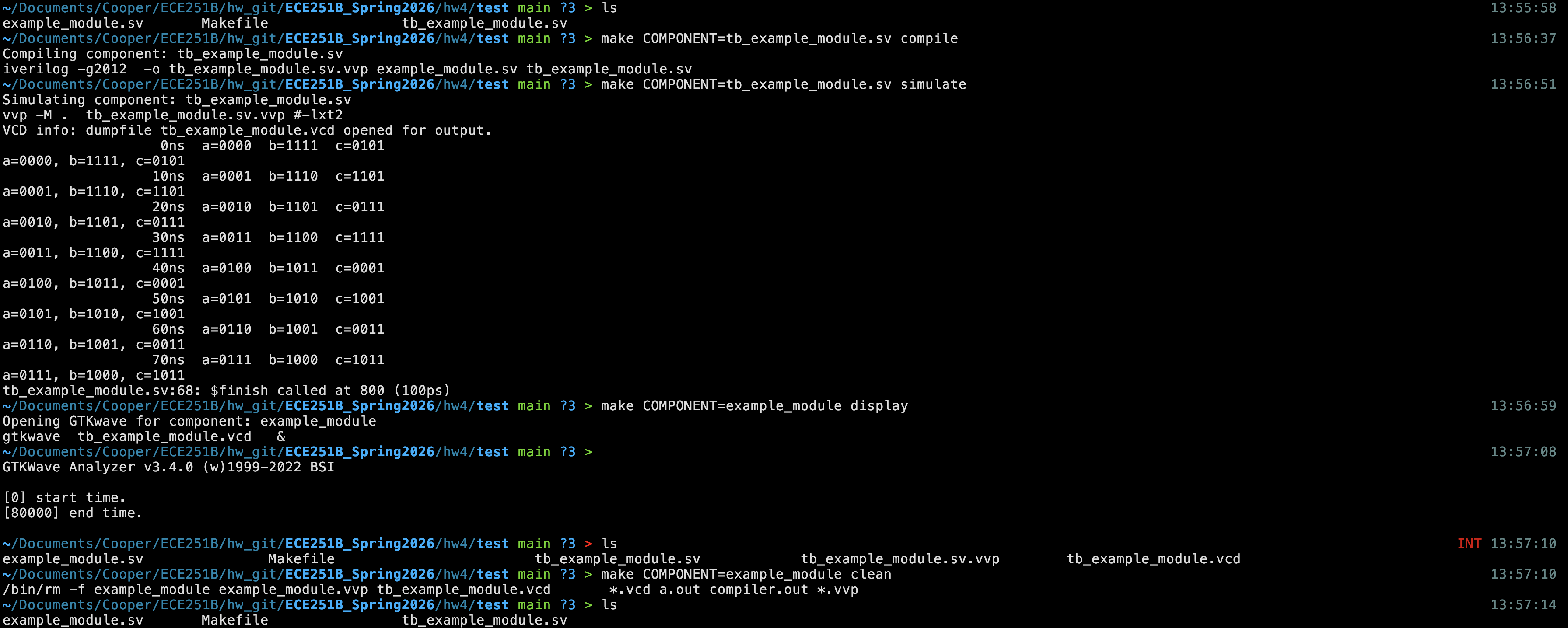
→ to compile
make COMPONENT=tb_example_module.sv compile
→ to run
make COMPONENT=tb_example_module.sv simulate
→ to display (GTKwave)
make COMPONENT=example_module display
→ to clean
make COMPONENT=example_module clean
Notice: It is still not that great of a Makefile, but I don’t know Makefiles well enough yet.